> ## Documentation Index
> Fetch the complete documentation index at: https://docs.vita.finance/llms.txt
> Use this file to discover all available pages before exploring further.
# Managing Your Orders
> Track, modify, and cancel orders on Vita CLOB
Learn how to track your open orders and manage your trading activity on Vita CLOB.
## Viewing Open Orders
### Order Management Interface
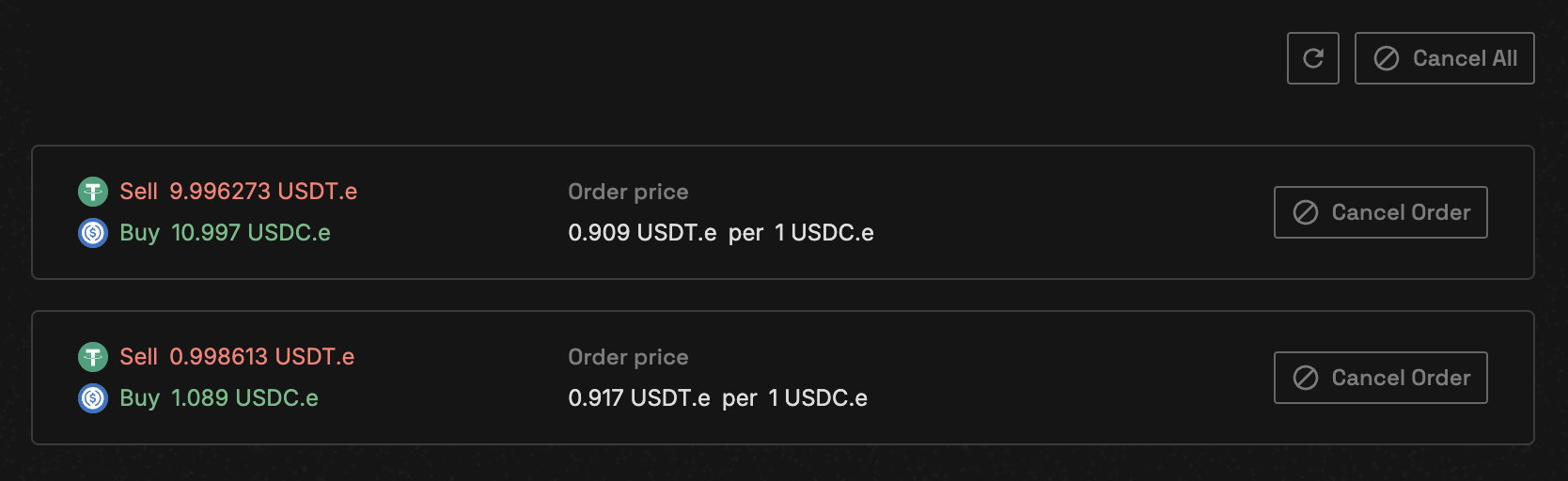 Your open orders display shows:
* **Order ID**: Unique identifier for each order
* **Type/Side**: Limit/Market and Buy/Sell
* **Price**: Your specified limit price
* **Filled/Remaining**: How much has been executed
* **Actions**: Cancel or modify options
### Querying Open Orders
```javascript Web3 theme={null}
// Direct contract interaction - No SDK available
const web3 = new Web3(window.ethereum);
const vitaCLOB = new web3.eth.Contract(VITA_CLOB_ABI, "[TBD]");
// Get all open orders for a market
const openOrders = await vitaCLOB.methods.getOpenOrders(
marketId, // Market ID (e.g., "1" for NEAR-USDC)
userAddress // Your account address
).call();
// Response structure
openOrders.forEach(order => {
console.log({
id: order.id,
price: order.limit_price,
openQty: order.open_qty,
originalQty: order.original_qty,
isBuy: order.is_buy,
timestamp: order.timestamp
});
});
```
```bash CLI theme={null}
# View your open orders via Near CLI
near view [TBD] get_open_orders '{
"market_id": "1",
"account_id": "user.near"
}'
```
### Single Order Query
To check a specific order:
```javascript Web3 theme={null}
// Direct contract interaction - No SDK available
const web3 = new Web3(window.ethereum);
const vitaCLOB = new web3.eth.Contract(VITA_CLOB_ABI, "[TBD]");
// Get details of a specific order
const orderDetails = await vitaCLOB.methods.getOpenOrder(
marketId, // Market ID
userAddress, // Your account
orderId // Specific order ID
).call();
```
```bash CLI theme={null}
# Query specific order
near view [TBD] get_open_order '{
"market_id": "1",
"account_id": "user.near",
"order_id": "12345"
}'
```
## Order Information Structure
```typescript theme={null}
interface OpenLimitOrderView {
id: string; // Order ID (u128)
limit_price: string; // Price in smallest units
open_qty: string; // Remaining quantity
original_qty?: string; // Initial order size
is_buy: boolean; // true = buy, false = sell
timestamp?: string; // Creation timestamp
user_id?: string; // Order owner
}
```
## Order Status Tracking
### Partial Fills
Orders can be partially filled when:
* Insufficient liquidity at your price
* Match limit reached (50 matches default)
* Market moves away from your price
Partially filled orders remain active for the unfilled portion until completed or cancelled
### Order Completion
Orders are automatically removed from the book when:
* Fully filled
* Cancelled by user
* Market becomes inactive
## Order Events
Track order lifecycle through events:
### New Order Event
```javascript theme={null}
{
account_id: "user.near",
market_id: "1",
order_id: "12345",
is_buy: true,
is_limit: true,
quantity: "1000000000000000000000000",
open_quantity: "1000000000000000000000000",
limit_price: "495000000",
taker_fee: "0"
}
```
### Fill Order Event
```javascript theme={null}
{
order_id: "12345",
market_id: "1",
fill_qty: "500000000000000000000000",
fill_price: "495000000",
quote_qty: "2475000000",
maker_order_id: "67890",
is_buy: true,
taker_account_id: "user.near",
maker_account_id: "maker.near"
}
```
## Best Practices
Check open orders frequently, especially in volatile markets
Monitor your trading performance and adjust strategies accordingly
Always monitor your open orders, especially during high volatility. Unfilled limit orders may execute at unexpected times as market conditions change.
## Cancelling Orders
### Cancel Single Order
```javascript Web3 theme={null}
// Direct contract interaction - No SDK available
const web3 = new Web3(window.ethereum);
const vitaCLOB = new web3.eth.Contract(VITA_CLOB_ABI, "[TBD]");
// Cancel a specific order
await vitaCLOB.methods.cancelOrder(
orderId // Order ID to cancel
).send({
from: userAddress,
gas: "30000000000000" // 30 TGas ≈ 0.003 NEAR
});
```
```bash CLI theme={null}
# Cancel order via Near CLI
near call [TBD] cancel_order '{
"order_id": "123456789"
}' --accountId user.near --gas 30000000000000
```
### Cancel Multiple Orders
```javascript Web3 theme={null}
// Cancel multiple orders at once
await vitaCLOB.methods.cancelOrders(
[orderId1, orderId2, orderId3] // Array of order IDs
).send({
from: userAddress,
gas: "50000000000000" // 50 TGas for multiple cancellations
});
```
```bash CLI theme={null}
# Cancel multiple orders
near call [TBD] cancel_orders '{
"order_ids": ["123456789", "987654321", "456789123"]
}' --accountId user.near --gas 50000000000000
```
Partially filled orders can be cancelled. The filled portion remains executed, only the remaining open quantity is cancelled.
## Market Depth Analysis
Check market depth before placing orders:
```javascript Web3 theme={null}
// Direct contract interaction - No SDK available
const web3 = new Web3(window.ethereum);
const vitaCLOB = new web3.eth.Contract(VITA_CLOB_ABI, "[TBD]");
// Query order book depth
const orderbook = await vitaCLOB.methods.getOrderbookDepth(
marketId // Market ID
).call();
// Analyze liquidity
console.log("Bids:", orderbook.bids);
console.log("Asks:", orderbook.asks);
console.log("Spread:", orderbook.spread);
```
```bash CLI theme={null}
# View order book depth
near view [TBD] get_orderbook_depth '{"market_id": "1"}'
```
## Troubleshooting Orders
Possible reasons:
* Order already filled
* Order cancelled
* Querying wrong market ID
* Network delay (wait a few seconds)
If your order is partially filled and not completing:
* Check current market price
* Verify liquidity at your price level
* Consider adjusting price or cancelling
Cancellation may fail if:
* Order already fully filled
* Order ID incorrect
* Network issues
* Insufficient gas (need \~0.003 NEAR)
## API Reference
### Query Methods
| Method | Description | Parameters |
| --------------------- | ------------------- | ---------------------------------- |
| `get_open_orders` | Get all open orders | market\_id, account\_id |
| `get_open_order` | Get specific order | market\_id, account\_id, order\_id |
| `get_orderbook_depth` | Get order book | market\_id |
### Order Management Methods
| Method | Description | Gas |
| --------------- | ---------------------- | ---------------------- |
| `cancel_order` | Cancel single order | \~30 TGas (0.003 NEAR) |
| `cancel_orders` | Cancel multiple orders | \~50 TGas (0.005 NEAR) |
## Next Steps
Learn how orders are matched and executed
Place your next order
Your open orders display shows:
* **Order ID**: Unique identifier for each order
* **Type/Side**: Limit/Market and Buy/Sell
* **Price**: Your specified limit price
* **Filled/Remaining**: How much has been executed
* **Actions**: Cancel or modify options
### Querying Open Orders
```javascript Web3 theme={null}
// Direct contract interaction - No SDK available
const web3 = new Web3(window.ethereum);
const vitaCLOB = new web3.eth.Contract(VITA_CLOB_ABI, "[TBD]");
// Get all open orders for a market
const openOrders = await vitaCLOB.methods.getOpenOrders(
marketId, // Market ID (e.g., "1" for NEAR-USDC)
userAddress // Your account address
).call();
// Response structure
openOrders.forEach(order => {
console.log({
id: order.id,
price: order.limit_price,
openQty: order.open_qty,
originalQty: order.original_qty,
isBuy: order.is_buy,
timestamp: order.timestamp
});
});
```
```bash CLI theme={null}
# View your open orders via Near CLI
near view [TBD] get_open_orders '{
"market_id": "1",
"account_id": "user.near"
}'
```
### Single Order Query
To check a specific order:
```javascript Web3 theme={null}
// Direct contract interaction - No SDK available
const web3 = new Web3(window.ethereum);
const vitaCLOB = new web3.eth.Contract(VITA_CLOB_ABI, "[TBD]");
// Get details of a specific order
const orderDetails = await vitaCLOB.methods.getOpenOrder(
marketId, // Market ID
userAddress, // Your account
orderId // Specific order ID
).call();
```
```bash CLI theme={null}
# Query specific order
near view [TBD] get_open_order '{
"market_id": "1",
"account_id": "user.near",
"order_id": "12345"
}'
```
## Order Information Structure
```typescript theme={null}
interface OpenLimitOrderView {
id: string; // Order ID (u128)
limit_price: string; // Price in smallest units
open_qty: string; // Remaining quantity
original_qty?: string; // Initial order size
is_buy: boolean; // true = buy, false = sell
timestamp?: string; // Creation timestamp
user_id?: string; // Order owner
}
```
## Order Status Tracking
### Partial Fills
Orders can be partially filled when:
* Insufficient liquidity at your price
* Match limit reached (50 matches default)
* Market moves away from your price
Partially filled orders remain active for the unfilled portion until completed or cancelled
### Order Completion
Orders are automatically removed from the book when:
* Fully filled
* Cancelled by user
* Market becomes inactive
## Order Events
Track order lifecycle through events:
### New Order Event
```javascript theme={null}
{
account_id: "user.near",
market_id: "1",
order_id: "12345",
is_buy: true,
is_limit: true,
quantity: "1000000000000000000000000",
open_quantity: "1000000000000000000000000",
limit_price: "495000000",
taker_fee: "0"
}
```
### Fill Order Event
```javascript theme={null}
{
order_id: "12345",
market_id: "1",
fill_qty: "500000000000000000000000",
fill_price: "495000000",
quote_qty: "2475000000",
maker_order_id: "67890",
is_buy: true,
taker_account_id: "user.near",
maker_account_id: "maker.near"
}
```
## Best Practices
Check open orders frequently, especially in volatile markets
Monitor your trading performance and adjust strategies accordingly
Always monitor your open orders, especially during high volatility. Unfilled limit orders may execute at unexpected times as market conditions change.
## Cancelling Orders
### Cancel Single Order
```javascript Web3 theme={null}
// Direct contract interaction - No SDK available
const web3 = new Web3(window.ethereum);
const vitaCLOB = new web3.eth.Contract(VITA_CLOB_ABI, "[TBD]");
// Cancel a specific order
await vitaCLOB.methods.cancelOrder(
orderId // Order ID to cancel
).send({
from: userAddress,
gas: "30000000000000" // 30 TGas ≈ 0.003 NEAR
});
```
```bash CLI theme={null}
# Cancel order via Near CLI
near call [TBD] cancel_order '{
"order_id": "123456789"
}' --accountId user.near --gas 30000000000000
```
### Cancel Multiple Orders
```javascript Web3 theme={null}
// Cancel multiple orders at once
await vitaCLOB.methods.cancelOrders(
[orderId1, orderId2, orderId3] // Array of order IDs
).send({
from: userAddress,
gas: "50000000000000" // 50 TGas for multiple cancellations
});
```
```bash CLI theme={null}
# Cancel multiple orders
near call [TBD] cancel_orders '{
"order_ids": ["123456789", "987654321", "456789123"]
}' --accountId user.near --gas 50000000000000
```
Partially filled orders can be cancelled. The filled portion remains executed, only the remaining open quantity is cancelled.
## Market Depth Analysis
Check market depth before placing orders:
```javascript Web3 theme={null}
// Direct contract interaction - No SDK available
const web3 = new Web3(window.ethereum);
const vitaCLOB = new web3.eth.Contract(VITA_CLOB_ABI, "[TBD]");
// Query order book depth
const orderbook = await vitaCLOB.methods.getOrderbookDepth(
marketId // Market ID
).call();
// Analyze liquidity
console.log("Bids:", orderbook.bids);
console.log("Asks:", orderbook.asks);
console.log("Spread:", orderbook.spread);
```
```bash CLI theme={null}
# View order book depth
near view [TBD] get_orderbook_depth '{"market_id": "1"}'
```
## Troubleshooting Orders
Possible reasons:
* Order already filled
* Order cancelled
* Querying wrong market ID
* Network delay (wait a few seconds)
If your order is partially filled and not completing:
* Check current market price
* Verify liquidity at your price level
* Consider adjusting price or cancelling
Cancellation may fail if:
* Order already fully filled
* Order ID incorrect
* Network issues
* Insufficient gas (need \~0.003 NEAR)
## API Reference
### Query Methods
| Method | Description | Parameters |
| --------------------- | ------------------- | ---------------------------------- |
| `get_open_orders` | Get all open orders | market\_id, account\_id |
| `get_open_order` | Get specific order | market\_id, account\_id, order\_id |
| `get_orderbook_depth` | Get order book | market\_id |
### Order Management Methods
| Method | Description | Gas |
| --------------- | ---------------------- | ---------------------- |
| `cancel_order` | Cancel single order | \~30 TGas (0.003 NEAR) |
| `cancel_orders` | Cancel multiple orders | \~50 TGas (0.005 NEAR) |
## Next Steps
Learn how orders are matched and executed
Place your next order