> ## Documentation Index
> Fetch the complete documentation index at: https://docs.vita.finance/llms.txt
> Use this file to discover all available pages before exploring further.

# Central Limit Order Book (CLOB)

> Professional trading with limit and market orders on Near Protocol

export const CLOBOrderBook = ({simplified = false}) => {
  const [isLoading, setIsLoading] = useState(true);
  const [selectedOrder, setSelectedOrder] = useState(null);
  const [executionSimulation, setExecutionSimulation] = useState(null);
  const [selectedMetric, setSelectedMetric] = useState(null);
  const [selectedPair, setSelectedPair] = useState('VITA/USDC');
  const pairData = {
    'VITA/USDC': {
      asks: [{
        price: 5.05,
        amount: 1000,
        total: 5050
      }, {
        price: 5.06,
        amount: 2500,
        total: 12650
      }, {
        price: 5.07,
        amount: 1800,
        total: 9126
      }, {
        price: 5.08,
        amount: 3200,
        total: 16256
      }, {
        price: 5.09,
        amount: 1500,
        total: 7635
      }],
      bids: [{
        price: 5.04,
        amount: 1200,
        total: 6048
      }, {
        price: 5.03,
        amount: 2800,
        total: 14084
      }, {
        price: 5.02,
        amount: 1600,
        total: 8032
      }, {
        price: 5.01,
        amount: 3500,
        total: 17535
      }, {
        price: 5.00,
        amount: 2000,
        total: 10000
      }],
      spread: {
        value: 0.01,
        percent: 0.20
      },
      midPrice: 5.045,
      volume: '1.2M',
      depth: '95.5K'
    },
    'VITA/NEAR': {
      asks: [{
        price: 0.252,
        amount: 5000,
        total: 1260
      }, {
        price: 0.253,
        amount: 3200,
        total: 809.6
      }, {
        price: 0.254,
        amount: 2800,
        total: 711.2
      }, {
        price: 0.255,
        amount: 4100,
        total: 1045.5
      }, {
        price: 0.256,
        amount: 1900,
        total: 486.4
      }],
      bids: [{
        price: 0.251,
        amount: 4200,
        total: 1054.2
      }, {
        price: 0.250,
        amount: 6800,
        total: 1700
      }, {
        price: 0.249,
        amount: 3500,
        total: 871.5
      }, {
        price: 0.248,
        amount: 5200,
        total: 1289.6
      }, {
        price: 0.247,
        amount: 2900,
        total: 716.3
      }],
      spread: {
        value: 0.001,
        percent: 0.40
      },
      midPrice: 0.2515,
      volume: '2.8M',
      depth: '145.2K'
    },
    'VITA/ETH': {
      asks: [{
        price: 0.001456,
        amount: 15000,
        total: 21.84
      }, {
        price: 0.001461,
        amount: 22000,
        total: 32.142
      }, {
        price: 0.001467,
        amount: 18500,
        total: 27.1395
      }, {
        price: 0.001472,
        amount: 31000,
        total: 45.632
      }, {
        price: 0.001478,
        amount: 12800,
        total: 18.9184
      }],
      bids: [{
        price: 0.001451,
        amount: 19500,
        total: 28.2945
      }, {
        price: 0.001446,
        amount: 28000,
        total: 40.488
      }, {
        price: 0.001441,
        amount: 24500,
        total: 35.3045
      }, {
        price: 0.001436,
        amount: 33500,
        total: 48.106
      }, {
        price: 0.001431,
        amount: 16800,
        total: 24.0408
      }],
      spread: {
        value: 0.000005,
        percent: 0.35
      },
      midPrice: 0.0014535,
      volume: '890K',
      depth: '67.8K'
    }
  };
  const orderBook = pairData[selectedPair];
  useEffect(() => {
    const timer = setTimeout(() => setIsLoading(false), 500);
    return () => clearTimeout(timer);
  }, []);
  const formatNumber = num => {
    if (window.VitaUtils?.format?.number) {
      return window.VitaUtils.format.number(num, 0);
    }
    return num.toLocaleString();
  };
  const formatPrice = price => {
    if (selectedPair === 'VITA/ETH') {
      return price.toFixed(6);
    } else if (selectedPair === 'VITA/NEAR') {
      return price.toFixed(3);
    }
    return price.toFixed(2);
  };
  const handleOrderClick = (order, type) => {
    setSelectedOrder({
      ...order,
      type
    });
    const simulation = {
      orderType: type === 'ask' ? 'Market Buy' : 'Market Sell',
      executionPrice: order.price,
      amount: order.amount,
      total: order.total,
      priceImpact: Math.random() * 0.5,
      estimatedGas: Math.floor(Math.random() * 50000) + 100000
    };
    setExecutionSimulation(simulation);
    setTimeout(() => {
      setSelectedOrder(null);
      setExecutionSimulation(null);
    }, 3000);
  };
  const handleMetricClick = metricType => {
    const bestBid = orderBook.bids[0]?.price || 0;
    const bestAsk = orderBook.asks[0]?.price || 0;
    const metricInfo = {
      spread: {
        title: 'Bid-Ask Spread',
        value: `$${formatPrice(orderBook?.spread?.value || 0)} (${(orderBook?.spread?.percent || 0).toFixed(2)}%)`,
        description: 'The difference between the highest bid and lowest ask price. Tighter spreads indicate better liquidity.',
        calculation: `Best Ask ($${formatPrice(bestAsk)}) - Best Bid ($${formatPrice(bestBid)}) = $${formatPrice(orderBook?.spread?.value || 0)}`,
        icon: '📊'
      },
      midPrice: {
        title: 'Mid Market Price',
        value: `$${formatPrice(orderBook.midPrice)}`,
        description: 'The average between the best bid and best ask price. Used as a reference for fair market value.',
        calculation: `(Best Bid + Best Ask) ÷ 2 = ($${formatPrice(bestBid)} + $${formatPrice(bestAsk)}) ÷ 2`,
        icon: '🎯'
      },
      volume: {
        title: '24h Trading Volume',
        value: `$${orderBook.volume}`,
        description: 'Total value of all trades executed in the past 24 hours. Higher volume indicates active market.',
        calculation: 'Sum of all executed trade values in 24h period',
        icon: '📈'
      },
      depth: {
        title: 'Order Book Depth',
        value: `$${orderBook.depth}`,
        description: 'Total value of all pending orders within 2% of mid price. Measures market liquidity depth.',
        calculation: `Sum of bid/ask orders within ±2% of mid price ($${formatPrice(orderBook.midPrice)})`,
        icon: '🌊'
      }
    };
    setSelectedMetric(metricInfo[metricType]);
    setTimeout(() => {
      setSelectedMetric(null);
    }, 12000);
  };
  if (simplified) {
    return <div className="w-full max-w-md mx-auto">
        <div className="bg-white dark:bg-gray-800 p-4 rounded-sm border border-gray-200 dark:border-gray-700">
          <div className="flex items-center justify-between mb-3">
            <h5 className="text-lg font-semibold text-gray-900 dark:text-white">Order Book</h5>
            <span className="text-xs text-gray-500 dark:text-gray-400">{selectedPair}</span>
          </div>
          <div className="space-y-1" role="region" aria-label="Order book data">
            {}
            {isLoading ? <div className="h-20 flex items-center justify-center">
                <div className="text-sm text-gray-500">Loading...</div>
              </div> : <>
                {orderBook.asks.slice(0, 3).reverse().map((ask, i) => <div key={`ask-${i}`} className="flex justify-between text-sm p-2 rounded-sm cursor-pointer transition-all hover:bg-red-50 dark:hover:bg-red-900/20 border border-transparent hover:border-red-200 dark:hover:border-red-800" role="button" tabIndex={0} onClick={() => handleOrderClick(ask, 'ask')} onKeyPress={e => (e.key === 'Enter' || e.key === ' ') && handleOrderClick(ask, 'ask')}>
                    <span className="text-red-600 dark:text-red-400 font-mono" aria-label={`Ask price ${formatPrice(ask.price)}`}>
                      ${formatPrice(ask.price)}
                    </span>
                    <span className="text-gray-600 dark:text-gray-400" aria-label={`Amount ${formatNumber(ask.amount)}`}>
                      {formatNumber(ask.amount)}
                    </span>
                  </div>)}
                
                {}
                <div className="border-t border-b border-gray-200 dark:border-gray-700 py-1 my-1">
                  <div className="text-center">
                    <span className="text-gray-900 dark:text-white font-semibold text-sm">
                      ${formatPrice(orderBook.bids[0].price)} - ${formatPrice(orderBook.asks[0].price)}
                    </span>
                    <span className="text-gray-500 dark:text-gray-400 text-xs ml-2">Spread</span>
                  </div>
                </div>
                
                {}
                {orderBook.bids.slice(0, 3).map((bid, i) => <div key={`bid-${i}`} className="flex justify-between text-sm p-2 rounded-sm cursor-pointer transition-all hover:bg-green-50 dark:hover:bg-green-900/20 border border-transparent hover:border-green-200 dark:hover:border-green-800" role="button" tabIndex={0} onClick={() => handleOrderClick(bid, 'bid')} onKeyPress={e => (e.key === 'Enter' || e.key === ' ') && handleOrderClick(bid, 'bid')}>
                    <span className="text-green-600 dark:text-green-400 font-mono" aria-label={`Bid price ${formatPrice(bid.price)}`}>
                      ${formatPrice(bid.price)}
                    </span>
                    <span className="text-gray-600 dark:text-gray-400" aria-label={`Amount ${formatNumber(bid.amount)}`}>
                      {formatNumber(bid.amount)}
                    </span>
                  </div>)}
              </>}
          </div>
          
          {}
          {executionSimulation && <div className="mt-4 p-3 bg-blue-50 dark:bg-blue-900/20 border border-blue-200 dark:border-blue-800 rounded-sm">
              <div className="flex items-center justify-between mb-2">
                <span className="text-sm font-semibold text-blue-800 dark:text-blue-200">
                  ⚡ {executionSimulation.orderType} Simulation
                </span>
                <span className="text-xs text-blue-600 dark:text-blue-300">Click detected!</span>
              </div>
              <div className="grid grid-cols-2 gap-2 text-xs">
                <div>
                  <span className="text-gray-600 dark:text-gray-400">Price:</span>
                  <span className="ml-1 font-mono text-gray-900 dark:text-white">${formatPrice(executionSimulation.executionPrice)}</span>
                </div>
                <div>
                  <span className="text-gray-600 dark:text-gray-400">Amount:</span>
                  <span className="ml-1 font-mono text-gray-900 dark:text-white">{formatNumber(executionSimulation.amount)}</span>
                </div>
                <div>
                  <span className="text-gray-600 dark:text-gray-400">Impact:</span>
                  <span className="ml-1 font-mono text-gray-900 dark:text-white">{executionSimulation.priceImpact.toFixed(3)}%</span>
                </div>
                <div>
                  <span className="text-gray-600 dark:text-gray-400">Gas:</span>
                  <span className="ml-1 font-mono text-gray-900 dark:text-white">{formatNumber(executionSimulation.estimatedGas)}</span>
                </div>
              </div>
            </div>}
        </div>
      </div>;
  }
  return <div className="w-full bg-gradient-to-br from-[#fb8f5a]/10 to-[#ffaf85]/10 p-6 rounded-sm border border-[#fb8f5a]/30">
      <div className="flex items-center justify-between mb-4">
        <h4 className="text-xl font-semibold text-gray-900 dark:text-white">
          Live Order Book Example
        </h4>
        <select value={selectedPair} onChange={e => setSelectedPair(e.target.value)} aria-label="Select trading pair" className="px-3 py-1 rounded-sm bg-white dark:bg-gray-800 border border-gray-300 dark:border-gray-600 text-sm text-gray-900 dark:text-white focus:border-[#fb8f5a] focus:outline-none">
          <option value="VITA/USDC">VITA/USDC</option>
          <option value="VITA/NEAR">VITA/NEAR</option>
          <option value="VITA/ETH">VITA/ETH</option>
        </select>
      </div>
      
      {isLoading ? <div className="h-64 flex items-center justify-center">
          <div className="text-gray-500 dark:text-gray-400">Loading order book...</div>
        </div> : <>
          <div className="grid grid-cols-1 lg:grid-cols-2 gap-6" role="table" aria-label="Full order book">
            {}
            <div>
              <div className="flex items-center justify-between mb-3">
                <h5 className="font-semibold text-red-600 dark:text-red-400">Asks (Sell Orders)</h5>
                <span className="text-xs text-gray-500 dark:text-gray-400">Price • Size • Total</span>
              </div>
              <div className="space-y-1" role="rowgroup">
                {orderBook.asks.reverse().map((ask, i) => <div key={`ask-full-${i}`} className="flex justify-between text-sm p-2 bg-gray-50 dark:bg-gray-900 rounded-sm hover:bg-red-50 dark:hover:bg-red-900/20 cursor-pointer border border-transparent hover:border-red-200 dark:hover:border-red-800 transition-all" role="button" tabIndex={0} onClick={() => handleOrderClick(ask, 'ask')} onKeyPress={e => (e.key === 'Enter' || e.key === ' ') && handleOrderClick(ask, 'ask')}>
                    <span className="text-red-600 dark:text-red-400 font-mono flex-1" role="cell">
                      ${formatPrice(ask.price)}
                    </span>
                    <span className="text-gray-600 dark:text-gray-400 flex-1 text-center" role="cell">
                      {formatNumber(ask.amount)}
                    </span>
                    <span className="text-gray-500 dark:text-gray-500 flex-1 text-right" role="cell">
                      ${formatNumber(ask.total)}
                    </span>
                  </div>)}
              </div>
            </div>
            
            {}
            <div>
              <div className="flex items-center justify-between mb-3">
                <h5 className="font-semibold text-green-600 dark:text-green-400">Bids (Buy Orders)</h5>
                <span className="text-xs text-gray-500 dark:text-gray-400">Price • Size • Total</span>
              </div>
              <div className="space-y-1" role="rowgroup">
                {orderBook.bids.map((bid, i) => <div key={`bid-full-${i}`} className="flex justify-between text-sm p-2 bg-gray-50 dark:bg-gray-900 rounded-sm hover:bg-green-50 dark:hover:bg-green-900/20 cursor-pointer border border-transparent hover:border-green-200 dark:hover:border-green-800 transition-all" role="button" tabIndex={0} onClick={() => handleOrderClick(bid, 'bid')} onKeyPress={e => (e.key === 'Enter' || e.key === ' ') && handleOrderClick(bid, 'bid')}>
                    <span className="text-green-600 dark:text-green-400 font-mono flex-1" role="cell">
                      ${formatPrice(bid.price)}
                    </span>
                    <span className="text-gray-600 dark:text-gray-400 flex-1 text-center" role="cell">
                      {formatNumber(bid.amount)}
                    </span>
                    <span className="text-gray-500 dark:text-gray-500 flex-1 text-right" role="cell">
                      ${formatNumber(bid.total)}
                    </span>
                  </div>)}
              </div>
            </div>
          </div>
          
          {}
          <div className="mt-6 grid grid-cols-2 md:grid-cols-4 gap-3" role="region" aria-label="Market statistics">
            <div className="bg-gray-50 dark:bg-gray-900 p-3 rounded-sm text-center cursor-pointer hover:bg-gray-100 dark:hover:bg-gray-800 transition-all border border-transparent hover:border-gray-300 dark:hover:border-gray-600 focus:outline-none focus:ring-2 focus:ring-gray-500/50" role="button" tabIndex={0} onClick={e => {
    handleMetricClick('spread');
    e.target.blur();
    setTimeout(() => e.target.blur(), 50);
  }} onKeyPress={e => {
    if (e.key === 'Enter' || e.key === ' ') {
      handleMetricClick('spread');
      e.target.blur();
      setTimeout(() => e.target.blur(), 50);
    }
  }}>
              <p className="text-xs text-gray-500 dark:text-gray-400 mb-1">Spread</p>
              <p className="font-mono font-bold text-gray-900 dark:text-white">
                ${formatPrice(orderBook?.spread?.value || 0)}
              </p>
                              <p className="text-xs text-gray-600 dark:text-gray-400">({(orderBook?.spread?.percent || 0).toFixed(2)}%)</p>
            </div>
            <div className="bg-gray-50 dark:bg-gray-900 p-3 rounded-sm text-center cursor-pointer hover:bg-gray-100 dark:hover:bg-gray-800 transition-all border border-transparent hover:border-gray-300 dark:hover:border-gray-600 focus:outline-none focus:ring-2 focus:ring-gray-500/50" role="button" tabIndex={0} onClick={e => {
    handleMetricClick('midPrice');
    e.target.blur();
    setTimeout(() => e.target.blur(), 50);
  }} onKeyPress={e => {
    if (e.key === 'Enter' || e.key === ' ') {
      handleMetricClick('midPrice');
      e.target.blur();
      setTimeout(() => e.target.blur(), 50);
    }
  }}>
              <p className="text-xs text-gray-500 dark:text-gray-400 mb-1">Mid Price</p>
              <p className="font-mono font-bold text-gray-900 dark:text-white" style={{
    fontFamily: 'monospace'
  }}>${formatPrice(orderBook.midPrice)}</p>
            </div>
            <div className="bg-gray-50 dark:bg-gray-900 p-3 rounded-sm text-center cursor-pointer hover:bg-gray-100 dark:hover:bg-gray-800 transition-all border border-transparent hover:border-gray-300 dark:hover:border-gray-600 focus:outline-none focus:ring-2 focus:ring-gray-500/50" role="button" tabIndex={0} onClick={e => {
    handleMetricClick('volume');
    e.target.blur();
    setTimeout(() => e.target.blur(), 50);
  }} onKeyPress={e => {
    if (e.key === 'Enter' || e.key === ' ') {
      handleMetricClick('volume');
      e.target.blur();
      setTimeout(() => e.target.blur(), 50);
    }
  }}>
              <p className="text-xs text-gray-500 dark:text-gray-400 mb-1">24h Volume</p>
              <p className="font-mono font-bold text-gray-900 dark:text-white" style={{
    fontFamily: 'monospace'
  }}>${orderBook.volume}</p>
            </div>
            <div className="bg-gray-50 dark:bg-gray-900 p-3 rounded-sm text-center cursor-pointer hover:bg-gray-100 dark:hover:bg-gray-800 transition-all border border-transparent hover:border-gray-300 dark:hover:border-gray-600 focus:outline-none focus:ring-2 focus:ring-gray-500/50" role="button" tabIndex={0} onClick={e => {
    handleMetricClick('depth');
    e.target.blur();
    setTimeout(() => e.target.blur(), 50);
  }} onKeyPress={e => {
    if (e.key === 'Enter' || e.key === ' ') {
      handleMetricClick('depth');
      e.target.blur();
      setTimeout(() => e.target.blur(), 50);
    }
  }}>
              <p className="text-xs text-gray-500 dark:text-gray-400 mb-1">Order Depth</p>
              <p className="font-mono font-bold text-gray-900 dark:text-white">${orderBook.depth}</p>
            </div>
          </div>
          
          {}
          {selectedMetric && <div className="mt-6 p-4 bg-purple-50 dark:bg-purple-900/20 border border-purple-200 dark:border-purple-800 rounded-sm">
              <div className="flex items-center justify-between mb-3">
                <span className="text-lg font-semibold text-purple-800 dark:text-purple-200 flex items-center gap-2">
                  {selectedMetric.icon} {selectedMetric.title}
                </span>
                <span className="text-sm text-purple-600 dark:text-purple-300">Metric clicked!</span>
              </div>
              <div className="space-y-3">
                <div className="text-center">
                  <p className="text-2xl font-mono font-bold text-gray-900 dark:text-white">{selectedMetric.value}</p>
                </div>
                <div className="grid grid-cols-1 md:grid-cols-2 gap-4">
                  <div>
                    <p className="text-sm font-semibold text-gray-900 dark:text-white mb-1">What it means:</p>
                    <p className="text-sm text-gray-600 dark:text-gray-400">{selectedMetric.description}</p>
                  </div>
                  <div>
                    <p className="text-sm font-semibold text-gray-900 dark:text-white mb-1">How it's calculated:</p>
                    <p className="text-sm text-gray-600 dark:text-gray-400 font-mono">{selectedMetric.calculation}</p>
                  </div>
                </div>
              </div>
            </div>}
          
          {}
          {executionSimulation && <div className="mt-6 p-4 bg-blue-50 dark:bg-blue-900/20 border border-blue-200 dark:border-blue-800 rounded-sm">
              <div className="flex items-center justify-between mb-3">
                <span className="text-lg font-semibold text-blue-800 dark:text-blue-200">
                  ⚡ {executionSimulation.orderType} Simulation
                </span>
                <span className="text-sm text-blue-600 dark:text-blue-300">Order clicked!</span>
              </div>
              <div className="grid grid-cols-2 md:grid-cols-4 gap-4">
                <div className="text-center">
                  <p className="text-xs text-gray-600 dark:text-gray-400 mb-1">Execution Price</p>
                  <p className="font-mono font-bold text-lg text-gray-900 dark:text-white">${formatPrice(executionSimulation.executionPrice)}</p>
                </div>
                <div className="text-center">
                  <p className="text-xs text-gray-600 dark:text-gray-400 mb-1">Amount</p>
                  <p className="font-mono font-bold text-lg text-gray-900 dark:text-white">{formatNumber(executionSimulation.amount)}</p>
                </div>
                <div className="text-center">
                  <p className="text-xs text-gray-600 dark:text-gray-400 mb-1">Price Impact</p>
                  <p className="font-mono font-bold text-lg text-gray-900 dark:text-white">{executionSimulation.priceImpact.toFixed(3)}%</p>
                </div>
                <div className="text-center">
                  <p className="text-xs text-gray-600 dark:text-gray-400 mb-1">Est. Gas</p>
                  <p className="font-mono font-bold text-lg text-gray-900 dark:text-white">{formatNumber(executionSimulation.estimatedGas)}</p>
                </div>
              </div>
              <div className="mt-3 text-center">
                <p className="text-sm text-gray-600 dark:text-gray-400">
                  💡 This is a simulation showing how a market order would execute against this order level
                </p>
              </div>
            </div>}
        </>}
    </div>;
};

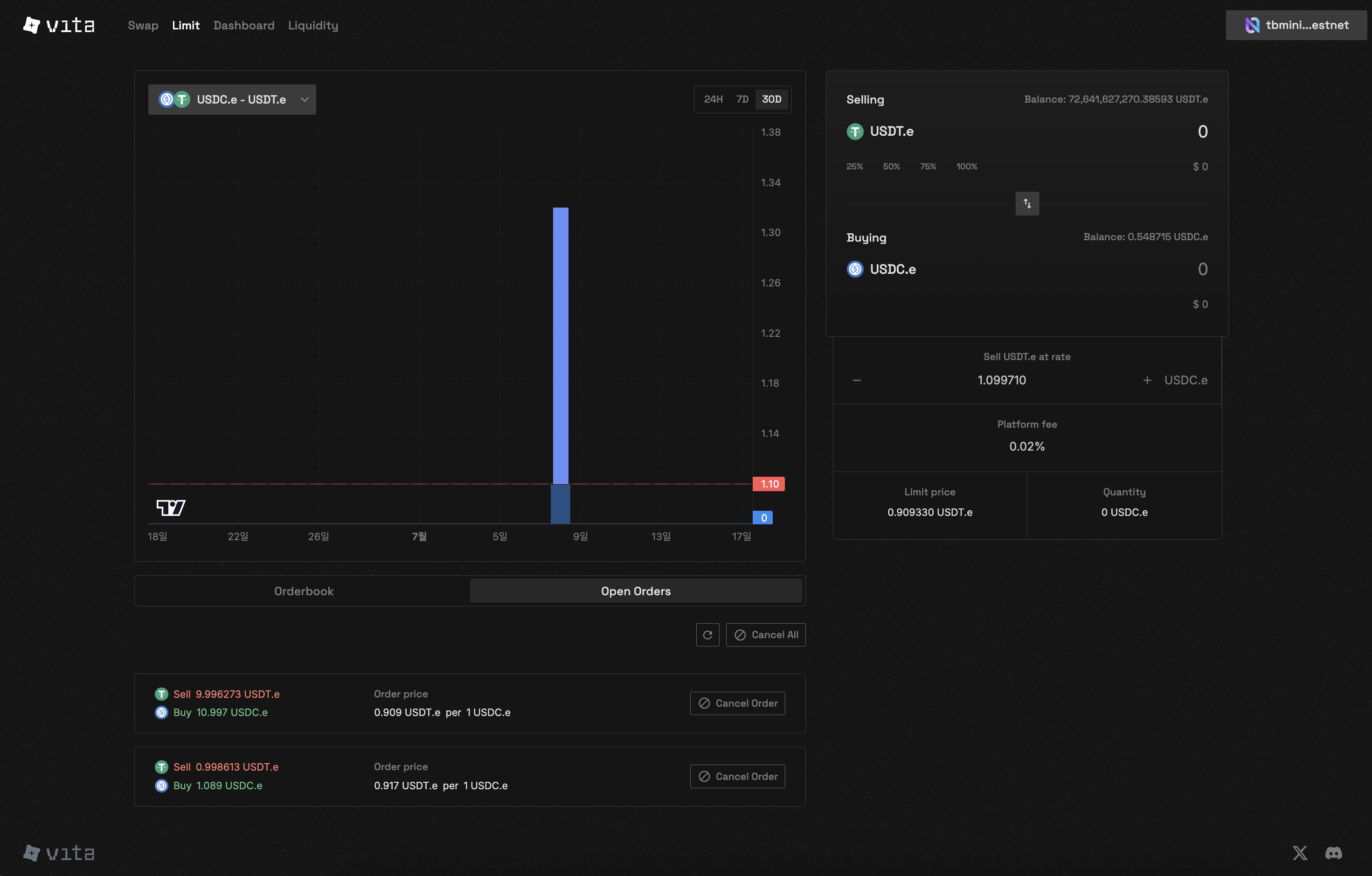
Vita Protocol's Central Limit Order Book (CLOB) brings professional trading capabilities to Near Protocol, offering traders precise control over their orders alongside our Concentrated Liquidity Market Maker (CLMM).

<CardGroup cols={3}>
  <Card title="Order Types" icon="list-check">
    Limit & Market Orders
  </Card>

  <Card title="Price-Time Priority" icon="sort">
    Fair Order Matching
  </Card>

  <Card title="Gas Efficiency" icon="fire">
    Optimized for Near
  </Card>
</CardGroup>

## What is a Central Limit Order Book?

A Central Limit Order Book (CLOB) is a trading mechanism where buy and sell orders are collected and matched based on price and time priority. Unlike automated market makers, CLOB allows traders to specify exact prices for their trades.

<Frame caption="Complete CLOB trading interface with order book, chart, and order placement">
  <img className="block dark:hidden" src="https://mintcdn.com/vita-29cb4832/0BX7ec2JKnkM5V86/images/screenshots/clob-trading-interface.png?fit=max&auto=format&n=0BX7ec2JKnkM5V86&q=85&s=f0346dae7000fa96e8386d1e70d51764" alt="CLOB Trading Interface" width="1634" height="1216" data-path="images/screenshots/clob-trading-interface.png" />

  <img className="hidden dark:block" src="https://mintcdn.com/vita-29cb4832/0BX7ec2JKnkM5V86/images/screenshots/clob-trading-interface.png?fit=max&auto=format&n=0BX7ec2JKnkM5V86&q=85&s=f0346dae7000fa96e8386d1e70d51764" alt="CLOB Trading Interface" width="1634" height="1216" data-path="images/screenshots/clob-trading-interface.png" />
</Frame>

## Order Book Interface

<Frame caption="Real-time order book showing live bid and ask orders with market depth">
  <img className="block dark:hidden" src="https://mintcdn.com/vita-29cb4832/0BX7ec2JKnkM5V86/images/screenshots/clob-orderbook-view.png?fit=max&auto=format&n=0BX7ec2JKnkM5V86&q=85&s=951aafba2c11f4672b069cc85f88c3be" alt="CLOB Order Book Interface" width="2942" height="1878" data-path="images/screenshots/clob-orderbook-view.png" />

  <img className="hidden dark:block" src="https://mintcdn.com/vita-29cb4832/0BX7ec2JKnkM5V86/images/screenshots/clob-orderbook-view.png?fit=max&auto=format&n=0BX7ec2JKnkM5V86&q=85&s=951aafba2c11f4672b069cc85f88c3be" alt="CLOB Order Book Interface" width="2942" height="1878" data-path="images/screenshots/clob-orderbook-view.png" />
</Frame>

## Key Features

<Tabs>
  <Tab title="Limit Orders">
    Set your exact buy or sell price. Orders execute only when market reaches your specified price.

    **Benefits:**

    * No price slippage
    * Better price control
    * Maker fees (if applicable)
  </Tab>

  <Tab title="Market Orders">
    Execute immediately at the best available price in the order book.

    **Benefits:**

    * Guaranteed execution
    * Instant trades
    * Simple to use
  </Tab>
</Tabs>

### Order Book Structure

<Frame caption="Real-time order book showing bid and ask prices">
  <img className="block dark:hidden" src="https://mintcdn.com/vita-29cb4832/0BX7ec2JKnkM5V86/images/screenshots/clob-orderbook-view.png?fit=max&auto=format&n=0BX7ec2JKnkM5V86&q=85&s=951aafba2c11f4672b069cc85f88c3be" alt="Order Book Interface" width="2942" height="1878" data-path="images/screenshots/clob-orderbook-view.png" />

  <img className="hidden dark:block" src="https://mintcdn.com/vita-29cb4832/0BX7ec2JKnkM5V86/images/screenshots/clob-orderbook-view.png?fit=max&auto=format&n=0BX7ec2JKnkM5V86&q=85&s=951aafba2c11f4672b069cc85f88c3be" alt="Order Book Interface" width="2942" height="1878" data-path="images/screenshots/clob-orderbook-view.png" />
</Frame>

The order book displays:

* **Bid Orders**: Buy orders sorted by highest price first
* **Ask Orders**: Sell orders sorted by lowest price first
* **Order Depth**: Quantity available at each price level
* **Spread**: Difference between best bid and best ask

### Interactive Order Book

<CLOBOrderBook />

## How CLOB Works

<Steps>
  <Step title="Place Your Order">
    Choose between limit or market order, specify price (for limit orders) and quantity
  </Step>

  <Step title="Order Matching">
    The matching engine processes orders based on price-time priority:

    * Best price gets matched first
    * Earlier orders at same price have priority
    * Maximum 50 matches per order
  </Step>

  <Step title="Settlement">
    Matched orders are settled instantly on Near Protocol

    * Tokens transferred automatically
    * Fees deducted from trade
  </Step>
</Steps>

## Markets and Trading Pairs

Vita CLOB supports dynamic market creation with any token pair. Each market is identified by:

* Base token (the asset being traded)
* Quote token (the currency used for pricing)
* Unique market ID

<Note>
  Market creation requires a deposit of 7 milliNEAR. Markets can be created with any combination of tokens. Available trading pairs will be announced at launch.
</Note>

## Fee Structure

Trading fees are set per market when created:

* Fee calculation: `(amount * 10000) / (10000 + fee_rate)`
* Fees are deducted from the quote token for buy orders
* Each market can have different fee rates set by the market creator
* View specific market fees: `near view [TBD] get_market '{"market_id": "1"}'`

<Warning>
  Self-trading (trading with your own orders) is prevented by the system
</Warning>

## Technical Specifications

### Order Limits

<ParamField path="minimum_order_size" type="string">
  1 lot (actual amount depends on market's lot\_decimals configuration)
</ParamField>

<ParamField path="maximum_matches_per_order" type="number">
  50
</ParamField>

<ParamField path="price_precision" type="string">
  Determined by lot decimal configuration
</ParamField>

### Contract Information

<ParamField path="platform" type="string">
  Near Protocol
</ParamField>

<ParamField path="programming_language" type="string">
  Rust
</ParamField>

<ParamField path="sdk_version" type="string">
  near-sdk 5.7.0
</ParamField>

<ParamField path="testnet_address" type="string">
  \[TBD]
</ParamField>

<ParamField path="mainnet_address" type="string">
  \[TBD]
</ParamField>

### Query Current Values

```bash theme={null}
# View all markets
near view [TBD] get_markets '{}'

# View specific market details (including fee rate)
near view [TBD] get_market '{"market_id": "1"}'

# View whitelisted tokens
near view [TBD] get_whitelisted_tokens '{}'

# View match limit
near view [TBD] get_match_limit '{}'
```

## Advantages of CLOB

<CardGroup cols={2}>
  <Card title="Price Discovery" icon="magnifying-glass">
    Transparent price formation through visible supply and demand
  </Card>

  <Card title="No Slippage" icon="shield-check">
    Limit orders execute at exact specified prices
  </Card>

  <Card title="Professional Trading" icon="chart-line">
    Advanced order types and trading strategies
  </Card>

  <Card title="Fair Execution" icon="scale-balanced">
    Price-time priority ensures fairness
  </Card>
</CardGroup>

## Getting Started

<Steps>
  <Step title="Connect Wallet">
    Connect your Near-compatible wallet to access CLOB
  </Step>

  <Step title="Select Market">
    Choose your trading pair from available markets
  </Step>

  <Step title="Place Order">
    Submit limit or market orders based on your strategy
  </Step>

  <Step title="Manage Positions">
    Track and manage your open orders
  </Step>
</Steps>

## CLOB vs AMM Comparison

<CLOBComparison />

| Feature              | CLOB                      | AMM                      |
| -------------------- | ------------------------- | ------------------------ |
| **Price Control**    | Exact price specification | Market-determined prices |
| **Liquidity Source** | Order book depth          | Liquidity pools          |
| **Slippage**         | None for limit orders     | Varies with trade size   |
| **Best For**         | Professional traders      | Simple swaps             |

## Security Features

<CardGroup cols={2}>
  <Card title="On-Chain Settlement" icon="lock">
    All trades settle directly on Near Protocol
  </Card>

  <Card title="Self-Trade Prevention" icon="ban">
    Cannot trade with your own orders
  </Card>

  <Card title="Gas Optimization" icon="gauge">
    Efficient matching with gas limits
  </Card>

  <Card title="Transparent Matching" icon="eye">
    All matches recorded on-chain
  </Card>
</CardGroup>

## Next Steps

<CardGroup cols={2}>
  <Card title="Order Types" icon="list" href="/clob/order-types">
    Learn about limit and market orders in detail
  </Card>

  <Card title="Place Orders" icon="plus" href="/clob/place-orders">
    Step-by-step guide to placing your first order
  </Card>

  <Card title="Order Matching" icon="shuffle" href="/clob/order-matching">
    Understand how orders are matched
  </Card>

  <Card title="Manage Orders" icon="list-check" href="/clob/manage-orders">
    Track and manage your orders
  </Card>
</CardGroup>