
> ## Documentation Index
> Fetch the complete documentation index at: https://docs.vita.finance/llms.txt
> Use this file to discover all available pages before exploring further.

# Placing Orders on CLOB

> Step-by-step guide to placing limit and market orders

export const TradingFlow = ({type = 'both'}) => {
  const [activeStep, setActiveStep] = useState(null);
  const [showComparison, setShowComparison] = useState(true);
  const handleStepClick = (flowType, stepNumber) => {
    const key = `${flowType}-${stepNumber}`;
    setActiveStep(activeStep === key ? null : key);
  };
  const AMMFlow = () => <div className="p-6 border-2 border-[#fb8f5a] rounded-sm bg-gray-50 dark:bg-gray-900">
      <h5 className="font-bold mb-4 text-[#fb8f5a] text-lg">AMM Swap Flow</h5>
      <div className="space-y-3" role="list">
        <div className={`flex items-start cursor-pointer transition-all ${activeStep === 'amm-1' ? 'bg-[#fb8f5a]/10 p-2 rounded-sm' : ''}`} onClick={() => handleStepClick('amm', 1)} onKeyPress={e => (e.key === 'Enter' || e.key === ' ') && handleStepClick('amm', 1)} role="listitem" tabIndex={0} aria-expanded={activeStep === 'amm-1'}>
          <span className="w-8 h-8 rounded-full bg-[#fb8f5a] text-white flex items-center justify-center font-bold flex-shrink-0" aria-label="Step 1">1</span>
          <div className="ml-4">
            <p className="font-medium text-gray-900 dark:text-white">User submits swap request</p>
            <p className="text-sm text-gray-600 dark:text-gray-400">Specify input token and amount</p>
            {activeStep === 'amm-1' && <div className="mt-2 p-2 bg-gray-100 dark:bg-gray-800 rounded-sm text-xs text-gray-600 dark:text-gray-400">
                Example: Swap 100 NEAR for USDC at current market rate
              </div>}
          </div>
        </div>
        <div className={`flex items-start cursor-pointer transition-all ${activeStep === 'amm-2' ? 'bg-[#fb8f5a]/10 p-2 rounded-sm' : ''}`} onClick={() => handleStepClick('amm', 2)} onKeyPress={e => (e.key === 'Enter' || e.key === ' ') && handleStepClick('amm', 2)} role="listitem" tabIndex={0} aria-expanded={activeStep === 'amm-2'}>
          <span className="w-8 h-8 rounded-full bg-[#fb8f5a] text-white flex items-center justify-center font-bold flex-shrink-0" aria-label="Step 2">2</span>
          <div className="ml-4">
            <p className="font-medium text-gray-900 dark:text-white">Calculate output using x*y=k formula</p>
            <p className="text-sm text-gray-600 dark:text-gray-400">Price determined by pool reserves</p>
            {activeStep === 'amm-2' && <div className="mt-2 p-2 bg-gray-100 dark:bg-gray-800 rounded-sm text-xs text-gray-600 dark:text-gray-400">
                Formula: outputAmount = (inputAmount * reserveOut) / (reserveIn + inputAmount)
              </div>}
          </div>
        </div>
        <div className={`flex items-start cursor-pointer transition-all ${activeStep === 'amm-3' ? 'bg-[#fb8f5a]/10 p-2 rounded-sm' : ''}`} onClick={() => handleStepClick('amm', 3)} onKeyPress={e => (e.key === 'Enter' || e.key === ' ') && handleStepClick('amm', 3)} role="listitem" tabIndex={0} aria-expanded={activeStep === 'amm-3'}>
          <span className="w-8 h-8 rounded-full bg-[#fb8f5a] text-white flex items-center justify-center font-bold flex-shrink-0" aria-label="Step 3">3</span>
          <div className="ml-4">
            <p className="font-medium text-gray-900 dark:text-white">Apply 0.30% trading fee</p>
            <p className="text-sm text-gray-600 dark:text-gray-400">35% goes to LPs, 65% to protocol</p>
            {activeStep === 'amm-3' && <div className="mt-2 p-2 bg-gray-100 dark:bg-gray-800 rounded-sm text-xs text-gray-600 dark:text-gray-400">
                On $1,000 trade: $3 fee → $1.05 to LPs, $1.95 to protocol
              </div>}
          </div>
        </div>
        <div className={`flex items-start cursor-pointer transition-all ${activeStep === 'amm-4' ? 'bg-[#fb8f5a]/10 p-2 rounded-sm' : ''}`} onClick={() => handleStepClick('amm', 4)} onKeyPress={e => (e.key === 'Enter' || e.key === ' ') && handleStepClick('amm', 4)} role="listitem" tabIndex={0} aria-expanded={activeStep === 'amm-4'}>
          <span className="w-8 h-8 rounded-full bg-[#fb8f5a] text-white flex items-center justify-center font-bold flex-shrink-0" aria-label="Step 4">4</span>
          <div className="ml-4">
            <p className="font-medium text-gray-900 dark:text-white">Execute swap instantly</p>
            <p className="text-sm text-gray-600 dark:text-gray-400">Update pool reserves and user balances</p>
            {activeStep === 'amm-4' && <div className="mt-2 p-2 bg-gray-100 dark:bg-gray-800 rounded-sm text-xs text-gray-600 dark:text-gray-400">
                Transaction completes in ~1-2 seconds on NEAR
              </div>}
          </div>
        </div>
      </div>
      
      {}
      <div className="mt-4 p-3 bg-gray-100 dark:bg-gray-950 rounded-sm">
        <p className="text-sm font-semibold mb-2 text-gray-900 dark:text-white">Key Characteristics:</p>
        <ul className="text-sm text-gray-600 dark:text-gray-400 space-y-1" role="list">
          <li role="listitem">• Always available liquidity</li>
          <li role="listitem">• Price slippage on large trades</li>
          <li role="listitem">• No order matching needed</li>
          <li role="listitem">• Instant execution</li>
        </ul>
      </div>
    </div>;
  const CLOBFlow = () => <div className="p-6 border-2 border-green-600 rounded-sm bg-gray-50 dark:bg-gray-900">
      <h5 className="font-bold mb-4 text-green-600 dark:text-green-400 text-lg">CLOB Trade Flow</h5>
      <div className="space-y-3" role="list">
        <div className={`flex items-start cursor-pointer transition-all ${activeStep === 'clob-1' ? 'bg-green-600/10 p-2 rounded-sm' : ''}`} onClick={() => handleStepClick('clob', 1)} onKeyPress={e => (e.key === 'Enter' || e.key === ' ') && handleStepClick('clob', 1)} role="listitem" tabIndex={0} aria-expanded={activeStep === 'clob-1'}>
          <span className="w-8 h-8 rounded-full bg-green-100 dark:bg-green-900 text-green-800 dark:text-green-200 flex items-center justify-center font-bold flex-shrink-0" aria-label="Step 1">1</span>
          <div className="ml-4">
            <p className="font-medium text-gray-900 dark:text-white">Place limit or market order</p>
            <p className="text-sm text-gray-600 dark:text-gray-400">Set price and size for limit orders</p>
            {activeStep === 'clob-1' && <div className="mt-2 p-2 bg-gray-100 dark:bg-gray-800 rounded-sm text-xs text-gray-600 dark:text-gray-400">
                Example: Buy 1000 VITA at $5.00 or better (limit order)
              </div>}
          </div>
        </div>
        <div className={`flex items-start cursor-pointer transition-all ${activeStep === 'clob-2' ? 'bg-green-600/10 p-2 rounded-sm' : ''}`} onClick={() => handleStepClick('clob', 2)} onKeyPress={e => (e.key === 'Enter' || e.key === ' ') && handleStepClick('clob', 2)} role="listitem" tabIndex={0} aria-expanded={activeStep === 'clob-2'}>
          <span className="w-8 h-8 rounded-full bg-green-100 dark:bg-green-900 text-green-800 dark:text-green-200 flex items-center justify-center font-bold flex-shrink-0" aria-label="Step 2">2</span>
          <div className="ml-4">
            <p className="font-medium text-gray-900 dark:text-white">Match with existing orders</p>
            <p className="text-sm text-gray-600 dark:text-gray-400">Price-time priority matching</p>
            {activeStep === 'clob-2' && <div className="mt-2 p-2 bg-gray-100 dark:bg-gray-800 rounded-sm text-xs text-gray-600 dark:text-gray-400">
                Orders at same price: first come, first served
              </div>}
          </div>
        </div>
        <div className={`flex items-start cursor-pointer transition-all ${activeStep === 'clob-3' ? 'bg-green-600/10 p-2 rounded-sm' : ''}`} onClick={() => handleStepClick('clob', 3)} onKeyPress={e => (e.key === 'Enter' || e.key === ' ') && handleStepClick('clob', 3)} role="listitem" tabIndex={0} aria-expanded={activeStep === 'clob-3'}>
          <span className="w-8 h-8 rounded-full bg-green-100 dark:bg-green-900 text-green-800 dark:text-green-200 flex items-center justify-center font-bold flex-shrink-0" aria-label="Step 3">3</span>
          <div className="ml-4">
            <p className="font-medium text-gray-900 dark:text-white">Apply maker/taker fees</p>
            <p className="text-sm text-gray-600 dark:text-gray-400">Makers: 0.02%, Takers: 0.05%</p>
            {activeStep === 'clob-3' && <div className="mt-2 p-2 bg-gray-100 dark:bg-gray-800 rounded-sm text-xs text-gray-600 dark:text-gray-400">
                Maker adds liquidity (limit order), Taker removes it (market order)
              </div>}
          </div>
        </div>
        <div className={`flex items-start cursor-pointer transition-all ${activeStep === 'clob-4' ? 'bg-green-600/10 p-2 rounded-sm' : ''}`} onClick={() => handleStepClick('clob', 4)} onKeyPress={e => (e.key === 'Enter' || e.key === ' ') && handleStepClick('clob', 4)} role="listitem" tabIndex={0} aria-expanded={activeStep === 'clob-4'}>
          <span className="w-8 h-8 rounded-full bg-green-100 dark:bg-green-900 text-green-800 dark:text-green-200 flex items-center justify-center font-bold flex-shrink-0" aria-label="Step 4">4</span>
          <div className="ml-4">
            <p className="font-medium text-gray-900 dark:text-white">Settle matched trades</p>
            <p className="text-sm text-gray-600 dark:text-gray-400">Update balances for all parties</p>
            {activeStep === 'clob-4' && <div className="mt-2 p-2 bg-gray-100 dark:bg-gray-800 rounded-sm text-xs text-gray-600 dark:text-gray-400">
                Both buyer and seller receive their assets instantly
              </div>}
          </div>
        </div>
      </div>
      
      {}
      <div className="mt-4 p-3 bg-gray-100 dark:bg-gray-950 rounded-sm">
        <p className="text-sm font-semibold mb-2 text-gray-900 dark:text-white">Key Characteristics:</p>
        <ul className="text-sm text-gray-600 dark:text-gray-400 space-y-1" role="list">
          <li role="listitem">• Best price discovery</li>
          <li role="listitem">• No slippage on limit orders</li>
          <li role="listitem">• Requires counterparty</li>
          <li role="listitem">• Professional trading features</li>
        </ul>
      </div>
    </div>;
  if (type === 'amm') {
    return <AMMFlow />;
  }
  if (type === 'clob') {
    return <CLOBFlow />;
  }
  return <div className="space-y-6">
      <div className="flex items-center justify-between mb-4">
        <h4 className="text-lg font-semibold text-gray-900 dark:text-white">Trading Flow Comparison</h4>
        <button onClick={() => setShowComparison(!showComparison)} className="text-sm text-[#fb8f5a] hover:text-[#ffaf85] transition-colors" aria-label={`${showComparison ? 'Hide' : 'Show'} detailed comparison`}>
          {showComparison ? 'Hide' : 'Show'} Comparison
        </button>
      </div>
      
      <div className="grid grid-cols-1 lg:grid-cols-2 gap-6">
        <AMMFlow />
        <CLOBFlow />
      </div>
      
      {}
      {showComparison && <div className="bg-blue-500/10 border border-blue-500/30 p-4 rounded-sm" role="region" aria-label="Trading method comparison">
          <h5 className="font-semibold mb-3 text-gray-900 dark:text-white">Quick Comparison</h5>
          <div className="grid grid-cols-1 md:grid-cols-2 gap-4 text-sm">
            <div>
              <p className="font-medium text-[#fb8f5a] mb-1">AMM Best For:</p>
              <ul className="text-gray-600 dark:text-gray-400 space-y-1" role="list">
                <li role="listitem">• Quick swaps</li>
                <li role="listitem">• Small to medium trades</li>
                <li role="listitem">• Guaranteed execution</li>
                <li role="listitem">• New traders</li>
              </ul>
            </div>
            <div>
              <p className="font-medium text-green-600 dark:text-green-400 mb-1">CLOB Best For:</p>
              <ul className="text-gray-600 dark:text-gray-400 space-y-1" role="list">
                <li role="listitem">• Large trades</li>
                <li role="listitem">• Price-sensitive orders</li>
                <li role="listitem">• Professional traders</li>
                <li role="listitem">• Advanced strategies</li>
              </ul>
            </div>
          </div>
          
          <div className="mt-4 pt-4 border-t border-blue-500/30">
            <p className="text-xs text-gray-500 dark:text-gray-500">
              <strong>Pro tip:</strong> Start with AMM for simplicity, graduate to CLOB for advanced trading.
            </p>
          </div>
        </div>}
    </div>;
};

Learn how to place limit and market orders on Vita CLOB with this comprehensive guide.

## Prerequisites

<Card title="Before You Start" icon="clipboard-check">
  * Near wallet connected (Near Wallet, Meteor, or Sender)
  * Sufficient token balance for trading
  * Gas fees: approximately **0.003-0.007 NEAR** per transaction
</Card>

## Placing a Limit Order

Limit orders allow you to set your exact buy or sell price.

<Steps>
  <Step title="Select Market">
    Choose your trading pair from the market selector

    <Frame caption="Market selection interface showing available trading pairs">
      <img className="block dark:hidden" src="https://mintcdn.com/vita-29cb4832/0BX7ec2JKnkM5V86/images/screenshots/clob-market-selector.png?fit=max&auto=format&n=0BX7ec2JKnkM5V86&q=85&s=3aac87eda1e660b3984550c46a5d781e" alt="Market Selector" width="440" height="118" data-path="images/screenshots/clob-market-selector.png" />

      <img className="hidden dark:block" src="https://mintcdn.com/vita-29cb4832/0BX7ec2JKnkM5V86/images/screenshots/clob-market-selector.png?fit=max&auto=format&n=0BX7ec2JKnkM5V86&q=85&s=3aac87eda1e660b3984550c46a5d781e" alt="Market Selector" width="440" height="118" data-path="images/screenshots/clob-market-selector.png" />
    </Frame>
  </Step>

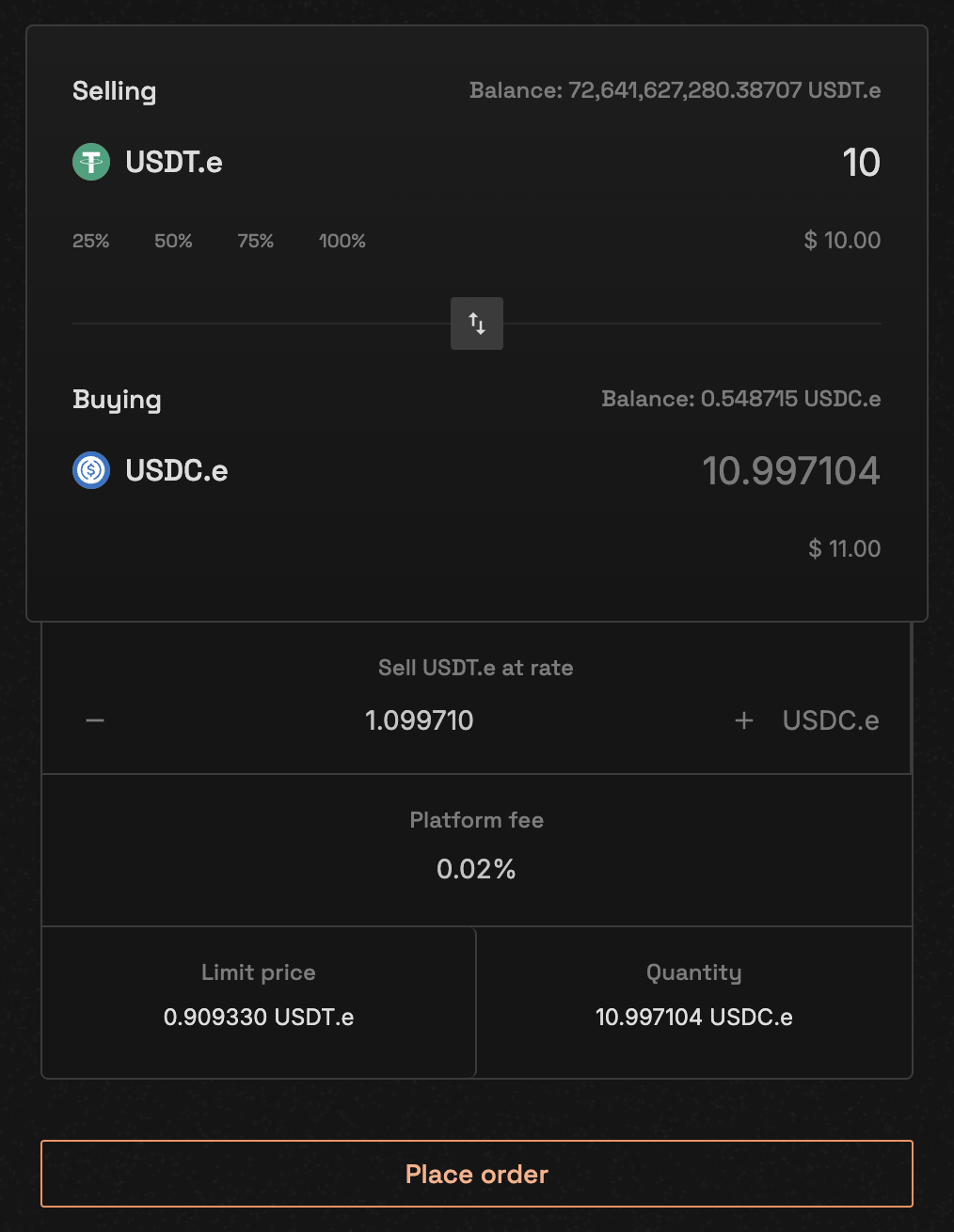
  <Step title="Choose Order Type">
    Select "Limit Order" and choose Buy or Sell

    <Frame caption="Order form with limit order selected">
      <img className="block dark:hidden" src="https://mintcdn.com/vita-29cb4832/0BX7ec2JKnkM5V86/images/screenshots/clob-place-order-form.png?fit=max&auto=format&n=0BX7ec2JKnkM5V86&q=85&s=cfca0caf8933de084a2ab9e17b654ef3" alt="Order Placement Form" width="1014" height="1310" data-path="images/screenshots/clob-place-order-form.png" />

      <img className="hidden dark:block" src="https://mintcdn.com/vita-29cb4832/0BX7ec2JKnkM5V86/images/screenshots/clob-place-order-form.png?fit=max&auto=format&n=0BX7ec2JKnkM5V86&q=85&s=cfca0caf8933de084a2ab9e17b654ef3" alt="Order Placement Form" width="1014" height="1310" data-path="images/screenshots/clob-place-order-form.png" />
    </Frame>
  </Step>

  <Step title="Enter Order Details">
    Fill in your order parameters:

    * **Limit price**: Your desired execution price
    * **Quantity**: Amount to trade
    * Review the platform fee
    * Check total value

    <Tip>
      Check the order book to see current bid/ask prices before setting your limit price
    </Tip>
  </Step>

  <Step title="Review and Confirm">
    * Check order details carefully
    * Review estimated fees
    * Click **Place order** button
    * Confirm the transaction in your wallet
  </Step>
</Steps>

### Limit Order Example

<CodeGroup>
  ```javascript Web3 theme={null}
  // Direct contract interaction - No SDK available
  const web3 = new Web3(window.ethereum);
  const vitaCLOB = new web3.eth.Contract(VITA_CLOB_ABI, "[TBD]");

  // Place buy limit order
  await vitaCLOB.methods.placeLimitBidOrder({
    market_id: 1,                    // NEAR-USDC market
    price: "495000000",              // 4.95 USDC (6 decimals)
    quantity: "1000000000000000000000000", // 1 NEAR (24 decimals)
    match_limit: 50                  // Default match limit
  }).send({ 
    from: userAddress,
    value: web3.utils.toWei('0.1', 'ether') // Deposit
  });
  ```

  ```bash CLI theme={null}
  # Place buy limit order via Near CLI
  near call [TBD] place_limit_bid_order '{
    "action": {
      "market_id": "1",
      "price": "495000000",
      "quantity": "1000000000000000000000000"
    }
  }' --accountId user.near --deposit 0.1
  ```
</CodeGroup>

## Placing a Market Order

Market orders execute immediately at the best available price.

<Steps>
  <Step title="Select Market Order">
    Choose "Market Order" instead of limit order

    <Note>
      Market orders don't require a price - only the quantity
    </Note>
  </Step>

  <Step title="Enter Quantity">
    Specify how much you want to buy or sell

    * The system will show estimated execution price
    * Check for price impact on large orders
  </Step>

  <Step title="Review Price Impact">
    <Warning>
      Large market orders may move the price significantly. Review the order book depth before placing large orders.
    </Warning>
  </Step>

  <Step title="Execute Order">
    Confirm the transaction to execute immediately
  </Step>
</Steps>

### Market Order Example

<CodeGroup>
  ```javascript Web3 theme={null}
  // Direct contract interaction - No SDK available
  const web3 = new Web3(window.ethereum);
  const vitaCLOB = new web3.eth.Contract(VITA_CLOB_ABI, "[TBD]");

  // Place market buy order
  await vitaCLOB.methods.placeMarketBidOrder({
    market_id: 1,                    // NEAR-USDC market
    quantity: "1000000000000000000000000", // 1 NEAR
    match_limit: 50                  // Default match limit
  }).send({ 
    from: userAddress,
    value: web3.utils.toWei('0.1', 'ether') // Deposit
  });
  ```

  ```bash CLI theme={null}
  # Place market buy order via Near CLI
  near call [TBD] place_market_bid_order '{
    "action": {
      "market_id": "1",
      "quantity": "1000000000000000000000000"
    }
  }' --accountId user.near --deposit 0.1
  ```
</CodeGroup>

## Trading Flow Visualization

<TradingFlow />

## Mobile Trading

Vita CLOB is optimized for mobile trading with responsive interfaces.

<CardGroup cols={2}>
  <Card>
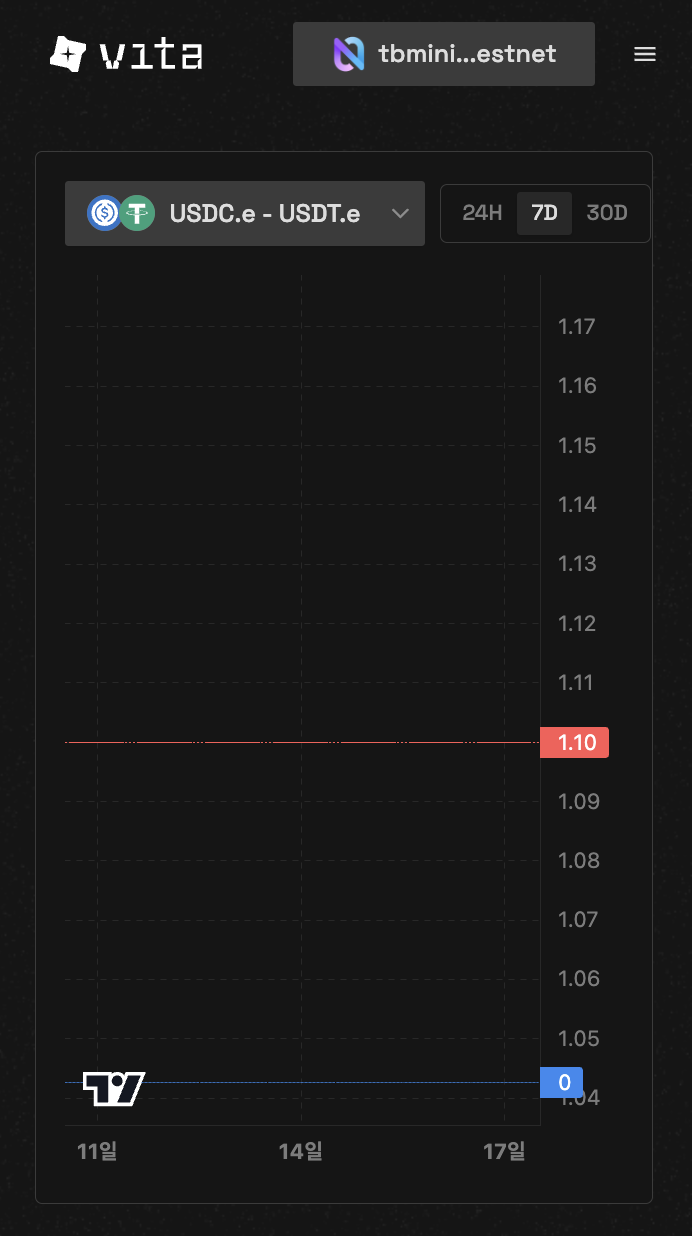
    <Frame caption="Mobile order book view">
      <img className="block dark:hidden" src="https://mintcdn.com/vita-29cb4832/0BX7ec2JKnkM5V86/images/screenshots/clob-mobile-orderbook.png?fit=max&auto=format&n=0BX7ec2JKnkM5V86&q=85&s=b1ed8709f1603ca65a9663300985cba7" alt="Mobile Order Book" width="692" height="1236" data-path="images/screenshots/clob-mobile-orderbook.png" />

      <img className="hidden dark:block" src="https://mintcdn.com/vita-29cb4832/0BX7ec2JKnkM5V86/images/screenshots/clob-mobile-orderbook.png?fit=max&auto=format&n=0BX7ec2JKnkM5V86&q=85&s=b1ed8709f1603ca65a9663300985cba7" alt="Mobile Order Book" width="692" height="1236" data-path="images/screenshots/clob-mobile-orderbook.png" />
    </Frame>
  </Card>

  <Card>
    <Frame caption="Mobile order placement">
      <img className="block dark:hidden" src="https://mintcdn.com/vita-29cb4832/0BX7ec2JKnkM5V86/images/screenshots/clob-mobile-place-order.png?fit=max&auto=format&n=0BX7ec2JKnkM5V86&q=85&s=42fc3ee580157dc1c27bd8f51c9e3e22" alt="Mobile Place Order" width="704" height="3628" data-path="images/screenshots/clob-mobile-place-order.png" />

      <img className="hidden dark:block" src="https://mintcdn.com/vita-29cb4832/0BX7ec2JKnkM5V86/images/screenshots/clob-mobile-place-order.png?fit=max&auto=format&n=0BX7ec2JKnkM5V86&q=85&s=42fc3ee580157dc1c27bd8f51c9e3e22" alt="Mobile Place Order" width="704" height="3628" data-path="images/screenshots/clob-mobile-place-order.png" />
    </Frame>
  </Card>
</CardGroup>

## Understanding Order Parameters

### Market ID

Each trading pair has a unique market ID:

* Generated from base and quote token addresses
* Includes decimal configurations
* Example: `1` for NEAR-USDC pair

### Price Formatting

Prices must account for token decimals:

| Description      | Formula/Example                           |
| ---------------- | ----------------------------------------- |
| **Actual Price** | `price / (10 ^ quote_token_decimals)`     |
| **Example**      | `495000000 = 4.95 USDC (with 6 decimals)` |

### Quantity Formatting

Quantities use the base token's decimal precision:

| Description            | Formula/Example                                    |
| ---------------------- | -------------------------------------------------- |
| **Actual Quantity**    | `quantity / (10 ^ base_token_decimals)`            |
| **Example**            | `1000000000000000000000000 = 1 NEAR (24 decimals)` |
| **Minimum order size** | `1 lot`                                            |
| **Lot size**           | `10^lot_decimals (varies by market)`               |

### Match Limit

* Default: 50 matches per order
* Prevents excessive gas consumption
* Can be adjusted based on needs

## Fee Calculation

<Info>
  **Trading fees are automatically calculated and deducted**

  For buy orders, fees are deducted from the quote token amount:

  * Formula: `net_amount = gross_amount * 10000 / (10000 + fee_rate)`
  * Fee rates are set per market by the market creator
  * Check specific market fees: `near view [TBD] get_market '{"market_id": "1"}'`
</Info>

## Order Validation

Before submitting, the system validates:

* Sufficient token balance
* Valid price (limit orders must be > 0)
* Market is active
* No self-trading

## Troubleshooting

<AccordionGroup>
  <Accordion title="Order rejected: Insufficient balance">
    Ensure you have enough tokens in your wallet:

    * For buy orders: Need quote token (e.g., USDC) + fees
    * For sell orders: Need base token (e.g., NEAR)
  </Accordion>

  <Accordion title="Order rejected: Market not active">
    The selected market may be paused. Check market status or try another pair.
  </Accordion>

  <Accordion title="Order rejected: Self trade">
    You cannot trade with your own orders. Cancel existing orders on the opposite side first.
  </Accordion>

  <Accordion title="Transaction failed">
    Common causes:

    * Insufficient gas fees
    * Network congestion
    * Wallet connection issues

    Try increasing gas or waiting a moment before retrying.
  </Accordion>
</AccordionGroup>

## Next Steps

<CardGroup cols={2}>
  <Card title="Manage Orders" icon="list-check" href="/clob/manage-orders">
    Learn to track and cancel your orders
  </Card>

  <Card title="Order Matching" icon="shuffle" href="/clob/order-matching">
    Understand how orders are matched
  </Card>
</CardGroup>
