

Viewing Open Orders
Order Management Interface
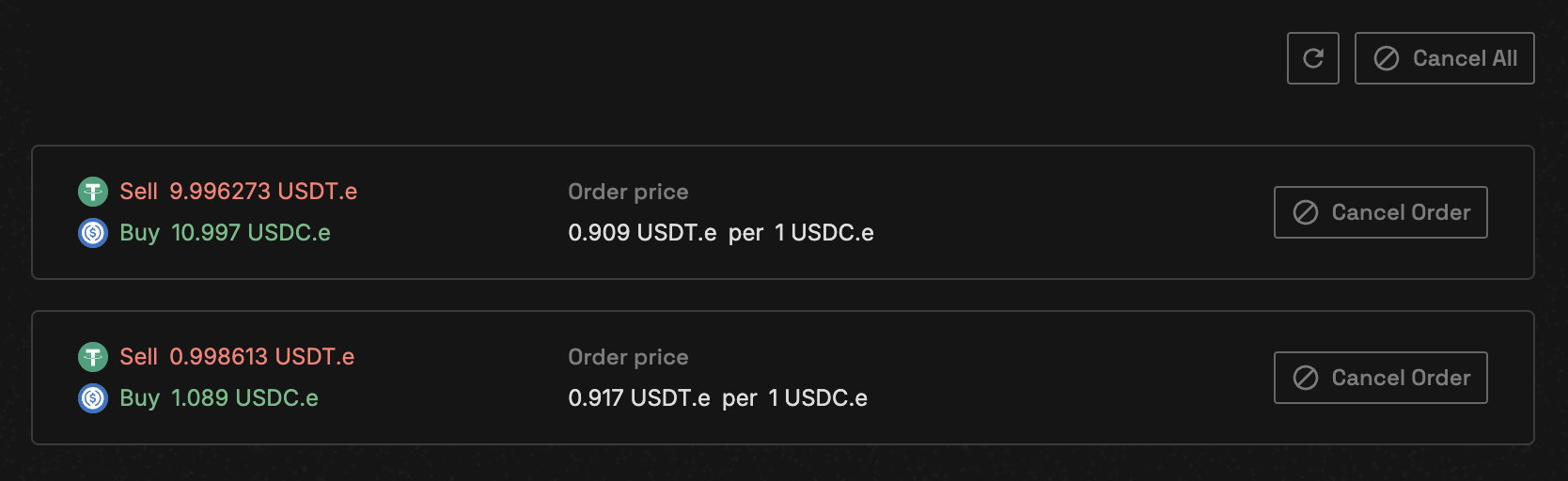
Your open orders display shows:
- Order ID: Unique identifier for each order
- Type/Side: Limit/Market and Buy/Sell
- Price: Your specified limit price
- Filled/Remaining: How much has been executed
- Actions: Cancel or modify options
Querying Open Orders
Single Order Query
To check a specific order:Order Information Structure
Order Status Tracking
Partial Fills
Orders can be partially filled when:- Insufficient liquidity at your price
- Match limit reached (50 matches default)
- Market moves away from your price
Partially filled orders remain active for the unfilled portion until completed or cancelled
Order Completion
Orders are automatically removed from the book when:- Fully filled
- Cancelled by user
- Market becomes inactive
Order Events
Track order lifecycle through events:New Order Event
Fill Order Event
Best Practices
Monitor Regularly
Check open orders frequently, especially in volatile markets
Track Performance
Monitor your trading performance and adjust strategies accordingly
Cancelling Orders
Cancel Single Order
Cancel Multiple Orders
Partially filled orders can be cancelled. The filled portion remains executed, only the remaining open quantity is cancelled.
Market Depth Analysis
Check market depth before placing orders:Troubleshooting Orders
Order not showing in open orders
Order not showing in open orders
Possible reasons:
- Order already filled
- Order cancelled
- Querying wrong market ID
- Network delay (wait a few seconds)
Partial fill stuck
Partial fill stuck
If your order is partially filled and not completing:
- Check current market price
- Verify liquidity at your price level
- Consider adjusting price or cancelling
Cannot cancel order
Cannot cancel order
Cancellation may fail if:
- Order already fully filled
- Order ID incorrect
- Network issues
- Insufficient gas (need ~0.003 NEAR)
API Reference
Query Methods
| Method | Description | Parameters |
|---|---|---|
get_open_orders | Get all open orders | market_id, account_id |
get_open_order | Get specific order | market_id, account_id, order_id |
get_orderbook_depth | Get order book | market_id |
Order Management Methods
| Method | Description | Gas |
|---|---|---|
cancel_order | Cancel single order | ~30 TGas (0.003 NEAR) |
cancel_orders | Cancel multiple orders | ~50 TGas (0.005 NEAR) |
Next Steps
Order Matching
Learn how orders are matched and executed
Place Orders
Place your next order